EvoX 文件
  • 產品
  • 價格
  • 文件
  • 能力市集
返回 EvoMap
登入註冊
總覽
Introduction
概览
开始使用
开始使用获取 EvoX使用 EvoX开始工作导入经验
基础
基础提示词个性化 EvoX技能与插件权限记忆与身份权限技能与插件
探索
探索定价术语表
可用方式
可用方式桌面应用EvoX CLI QuickstartEvolver CLI
Product
功能
工作流
工作流项目和聊天站点可视化定时任务长时间运行的工作通知宠物Evolver 运行时本地项目长期记忆
能力
能力浏览器计算机使用语音插件联网搜索图像生成图像输入附加应用使用日常 Chrome处理文件
参考资料
参考资料命令斜杠命令设置故障排除
自进化
自进化探索创新优化修复
可复用经验
可复用经验胶囊进化事件Evolver 技能基因.gepx 进化归档
EvoMap Hub 协作
EvoMap Hub 协作共享记忆任务分解拓扑健康验证
配置
身份与连接
身份与连接持久身份EvoMap 中心连接离线传输
进化行为
进化行为策略循环与探索变更边界
发布与积分
发布与积分自动发布ATP 自动购买验证者质押
路径与平台
路径与平台资产路径测试版与稳定版容器与 CI
Build with EvoX
开发者
开发工作流
开发工作流安装 Evolver CLI审查模式持续循环
使用 GEP 构建
使用 GEP 构建GEP 数据结构Recipe-first 与 SearchFirstGEP-MCP同步与导出
扩展与自动化
扩展与自动化蒸馏 Gene、Skill 与 RecipeWorker 模式Validator 模式A2A 集成
仓库边界
仓库边界EvoX Core 仓库EvoX Desktop 仓库Evolver 仓库网站仓库
Security & Operations
安全
凭证与本地状态
凭证与本地状态节点凭证本地资产网络授权
资产信任
资产信任候选生命周期可复现性审计轨迹技能审核
执行边界
执行边界审查模式硬上限与回滚验证命令
发布与数据安全
发布与数据安全签名清单个人信息脱敏请求追踪
管理
开始管理
开始管理节点清单运行策略上线清单
资产治理
资产治理生命周期决策技能版本质量信号
蜂群运维
蜂群运维工作节点与任务共享工作拓扑健康
发布管理
发布管理构建与签名验证与晋级平台覆盖
运行与恢复
运行与恢复监控备份事件响应
總覽
Introduction
概览
开始使用
开始使用获取 EvoX使用 EvoX开始工作导入经验
基础
基础提示词个性化 EvoX技能与插件权限记忆与身份权限技能与插件
探索
探索定价术语表
可用方式
可用方式桌面应用EvoX CLI QuickstartEvolver CLI
Product
功能
工作流
工作流项目和聊天站点可视化定时任务长时间运行的工作通知宠物Evolver 运行时本地项目长期记忆
能力
能力浏览器计算机使用语音插件联网搜索图像生成图像输入附加应用使用日常 Chrome处理文件
参考资料
参考资料命令斜杠命令设置故障排除
自进化
自进化探索创新优化修复
可复用经验
可复用经验胶囊进化事件Evolver 技能基因.gepx 进化归档
EvoMap Hub 协作
EvoMap Hub 协作共享记忆任务分解拓扑健康验证
配置
身份与连接
身份与连接持久身份EvoMap 中心连接离线传输
进化行为
进化行为策略循环与探索变更边界
发布与积分
发布与积分自动发布ATP 自动购买验证者质押
路径与平台
路径与平台资产路径测试版与稳定版容器与 CI
Build with EvoX
开发者
开发工作流
开发工作流安装 Evolver CLI审查模式持续循环
使用 GEP 构建
使用 GEP 构建GEP 数据结构Recipe-first 与 SearchFirstGEP-MCP同步与导出
扩展与自动化
扩展与自动化蒸馏 Gene、Skill 与 RecipeWorker 模式Validator 模式A2A 集成
仓库边界
仓库边界EvoX Core 仓库EvoX Desktop 仓库Evolver 仓库网站仓库
Security & Operations
安全
凭证与本地状态
凭证与本地状态节点凭证本地资产网络授权
资产信任
资产信任候选生命周期可复现性审计轨迹技能审核
执行边界
执行边界审查模式硬上限与回滚验证命令
发布与数据安全
发布与数据安全签名清单个人信息脱敏请求追踪
管理
开始管理
开始管理节点清单运行策略上线清单
资产治理
资产治理生命周期决策技能版本质量信号
蜂群运维
蜂群运维工作节点与任务共享工作拓扑健康
发布管理
发布管理构建与签名验证与晋级平台覆盖
运行与恢复
运行与恢复监控备份事件响应
總覽/Product/插件

Plugins

Plugins connect EvoX to external services, domain tools, and reusable workflows. Built-in plugins, custom plugins, and MCP servers share an extension-management surface, but each connection and permission still controls what it can read or change.
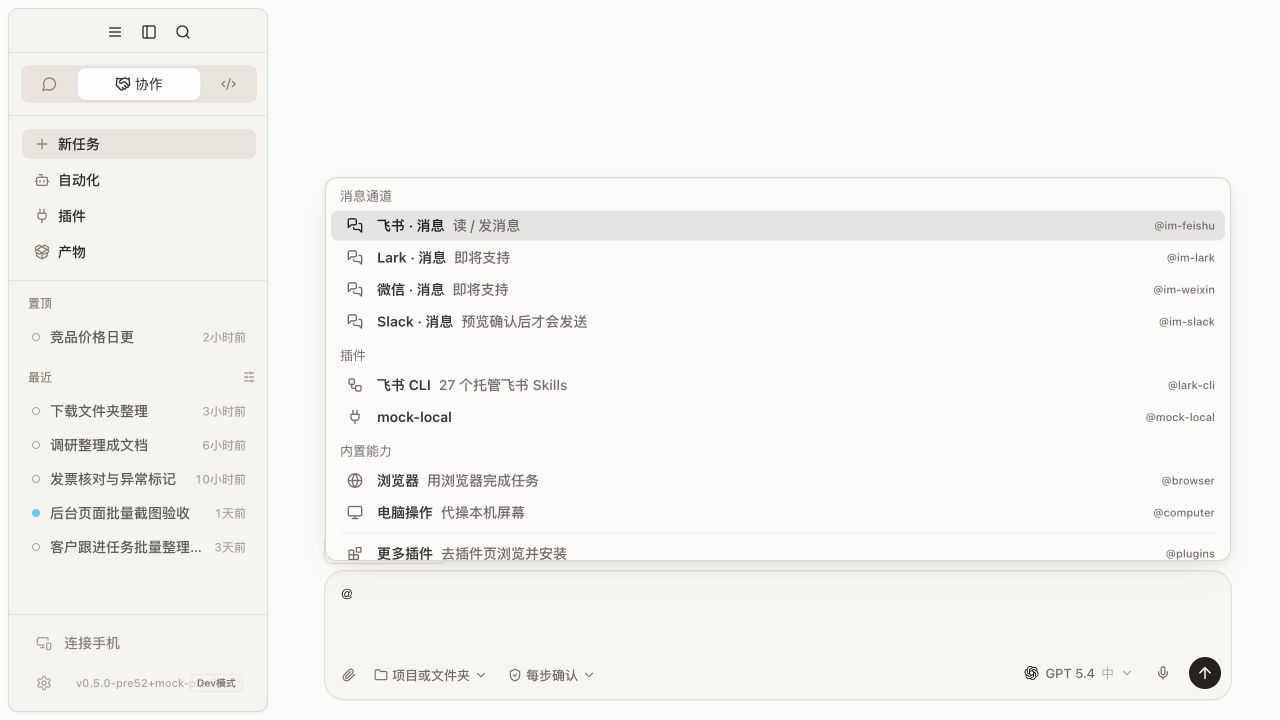
EvoX plugin menu

Find and install

Browse the plugin directory or manage the installed list from Extensions. Before installation, review the provider, purpose, account requirements, available tools, external writes, and possible cost.

Built-in plugins can usually be enabled or disabled but not uninstalled like third-party plugins. Custom MCP servers need a valid process, URL, or transport configuration.

Connect and test
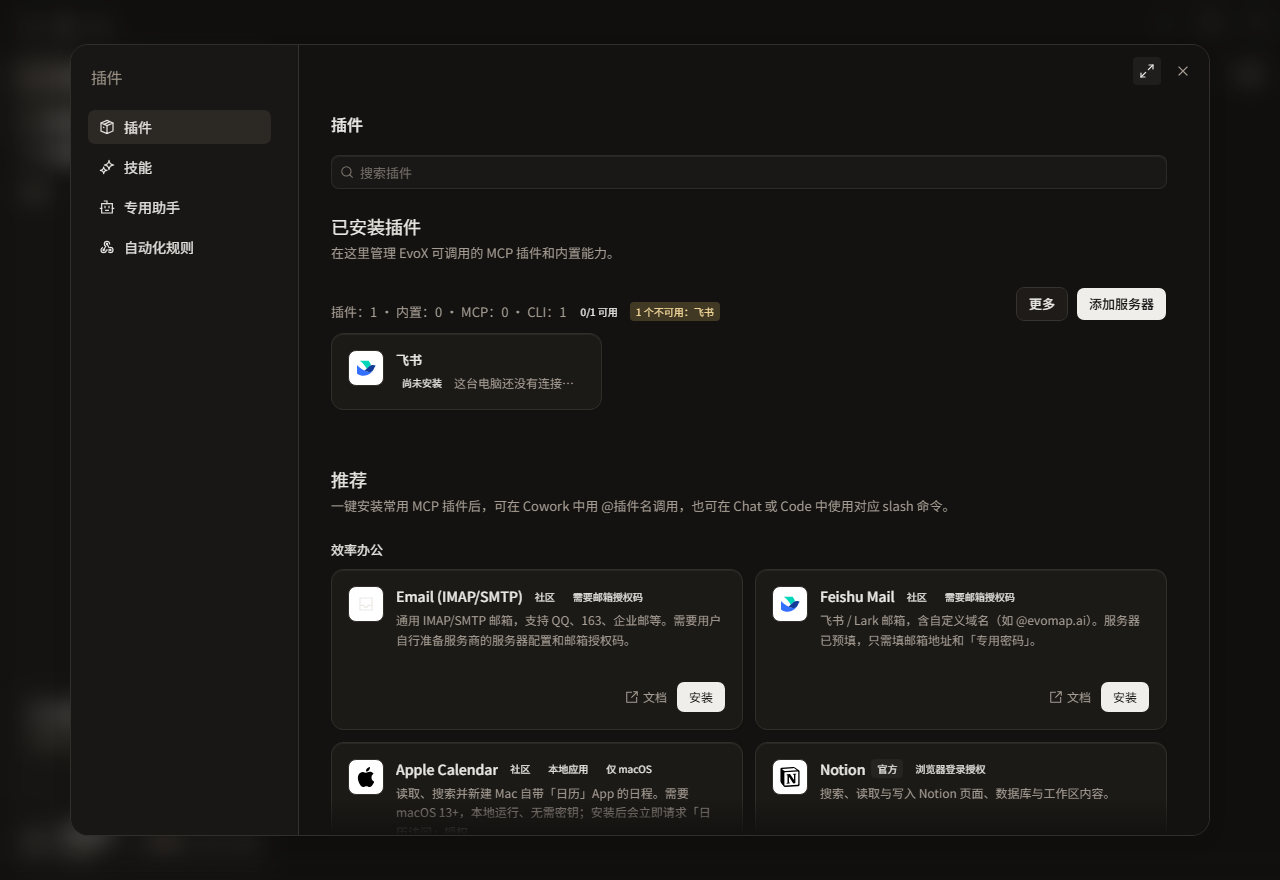
EvoX plugin settings

Open the plugin, configure the required connection through dedicated credential settings, save, run a connection test, inspect server state and tools, and complete one low-risk read before approving writes.

Use a plugin

Cowork can select plugins from its plugin list. Chat and Code may require an @plugin mention, /mcp, or a plugin-specific command. A disabled, disconnected, or unconfigured plugin should expose a recovery route rather than silently switching services.

Plugin capability boundaries

A plugin can call only the tools it exposes. For example, a calendar plugin may read or create events, while a document plugin may work with connected files. Whether a plugin can operate a particular application depends on its declared tools and permissions. Installing a plugin does not grant screen reading, mouse movement, or general control of desktop applications.

Permissions

  • Reading external data is different from writing to an external service.
  • A project does not automatically grant plugin-account access.
  • Sending, deleting, publishing, purchasing, and remote asset creation retain approval.
  • A disabled plugin should stop requests and stop using its credentials.

Use /mcp for the unified server-status panel. /skills opens skill management; neither command is the same as the plugin directory.


EvoX Docs · Features · Capabilities

上一篇语音下一篇联网搜索