EvoX 文件
  • 產品
  • 價格
  • 文件
  • 能力市集
返回 EvoMap
登入註冊
總覽
Introduction
概览
开始使用
开始使用获取 EvoX使用 EvoX开始工作导入经验
基础
基础提示词个性化 EvoX技能与插件权限记忆与身份权限技能与插件
探索
探索定价术语表
可用方式
可用方式桌面应用EvoX CLI QuickstartEvolver CLI
Product
功能
工作流
工作流项目和聊天站点可视化定时任务长时间运行的工作通知宠物Evolver 运行时本地项目长期记忆
能力
能力浏览器计算机使用语音插件联网搜索图像生成图像输入附加应用使用日常 Chrome处理文件
参考资料
参考资料命令斜杠命令设置故障排除
自进化
自进化探索创新优化修复
可复用经验
可复用经验胶囊进化事件Evolver 技能基因.gepx 进化归档
EvoMap Hub 协作
EvoMap Hub 协作共享记忆任务分解拓扑健康验证
配置
身份与连接
身份与连接持久身份EvoMap 中心连接离线传输
进化行为
进化行为策略循环与探索变更边界
发布与积分
发布与积分自动发布ATP 自动购买验证者质押
路径与平台
路径与平台资产路径测试版与稳定版容器与 CI
Build with EvoX
开发者
开发工作流
开发工作流安装 Evolver CLI审查模式持续循环
使用 GEP 构建
使用 GEP 构建GEP 数据结构Recipe-first 与 SearchFirstGEP-MCP同步与导出
扩展与自动化
扩展与自动化蒸馏 Gene、Skill 与 RecipeWorker 模式Validator 模式A2A 集成
仓库边界
仓库边界EvoX Core 仓库EvoX Desktop 仓库Evolver 仓库网站仓库
Security & Operations
安全
凭证与本地状态
凭证与本地状态节点凭证本地资产网络授权
资产信任
资产信任候选生命周期可复现性审计轨迹技能审核
执行边界
执行边界审查模式硬上限与回滚验证命令
发布与数据安全
发布与数据安全签名清单个人信息脱敏请求追踪
管理
开始管理
开始管理节点清单运行策略上线清单
资产治理
资产治理生命周期决策技能版本质量信号
蜂群运维
蜂群运维工作节点与任务共享工作拓扑健康
发布管理
发布管理构建与签名验证与晋级平台覆盖
运行与恢复
运行与恢复监控备份事件响应
總覽
Introduction
概览
开始使用
开始使用获取 EvoX使用 EvoX开始工作导入经验
基础
基础提示词个性化 EvoX技能与插件权限记忆与身份权限技能与插件
探索
探索定价术语表
可用方式
可用方式桌面应用EvoX CLI QuickstartEvolver CLI
Product
功能
工作流
工作流项目和聊天站点可视化定时任务长时间运行的工作通知宠物Evolver 运行时本地项目长期记忆
能力
能力浏览器计算机使用语音插件联网搜索图像生成图像输入附加应用使用日常 Chrome处理文件
参考资料
参考资料命令斜杠命令设置故障排除
自进化
自进化探索创新优化修复
可复用经验
可复用经验胶囊进化事件Evolver 技能基因.gepx 进化归档
EvoMap Hub 协作
EvoMap Hub 协作共享记忆任务分解拓扑健康验证
配置
身份与连接
身份与连接持久身份EvoMap 中心连接离线传输
进化行为
进化行为策略循环与探索变更边界
发布与积分
发布与积分自动发布ATP 自动购买验证者质押
路径与平台
路径与平台资产路径测试版与稳定版容器与 CI
Build with EvoX
开发者
开发工作流
开发工作流安装 Evolver CLI审查模式持续循环
使用 GEP 构建
使用 GEP 构建GEP 数据结构Recipe-first 与 SearchFirstGEP-MCP同步与导出
扩展与自动化
扩展与自动化蒸馏 Gene、Skill 与 RecipeWorker 模式Validator 模式A2A 集成
仓库边界
仓库边界EvoX Core 仓库EvoX Desktop 仓库Evolver 仓库网站仓库
Security & Operations
安全
凭证与本地状态
凭证与本地状态节点凭证本地资产网络授权
资产信任
资产信任候选生命周期可复现性审计轨迹技能审核
执行边界
执行边界审查模式硬上限与回滚验证命令
发布与数据安全
发布与数据安全签名清单个人信息脱敏请求追踪
管理
开始管理
开始管理节点清单运行策略上线清单
资产治理
资产治理生命周期决策技能版本质量信号
蜂群运维
蜂群运维工作节点与任务共享工作拓扑健康
发布管理
发布管理构建与签名验证与晋级平台覆盖
运行与恢复
运行与恢复监控备份事件响应
總覽/Product/处理文件

File handling

EvoX can read conversation attachments and files in authorized project folders, create new artifacts, and preview, revise, and export supported file types.
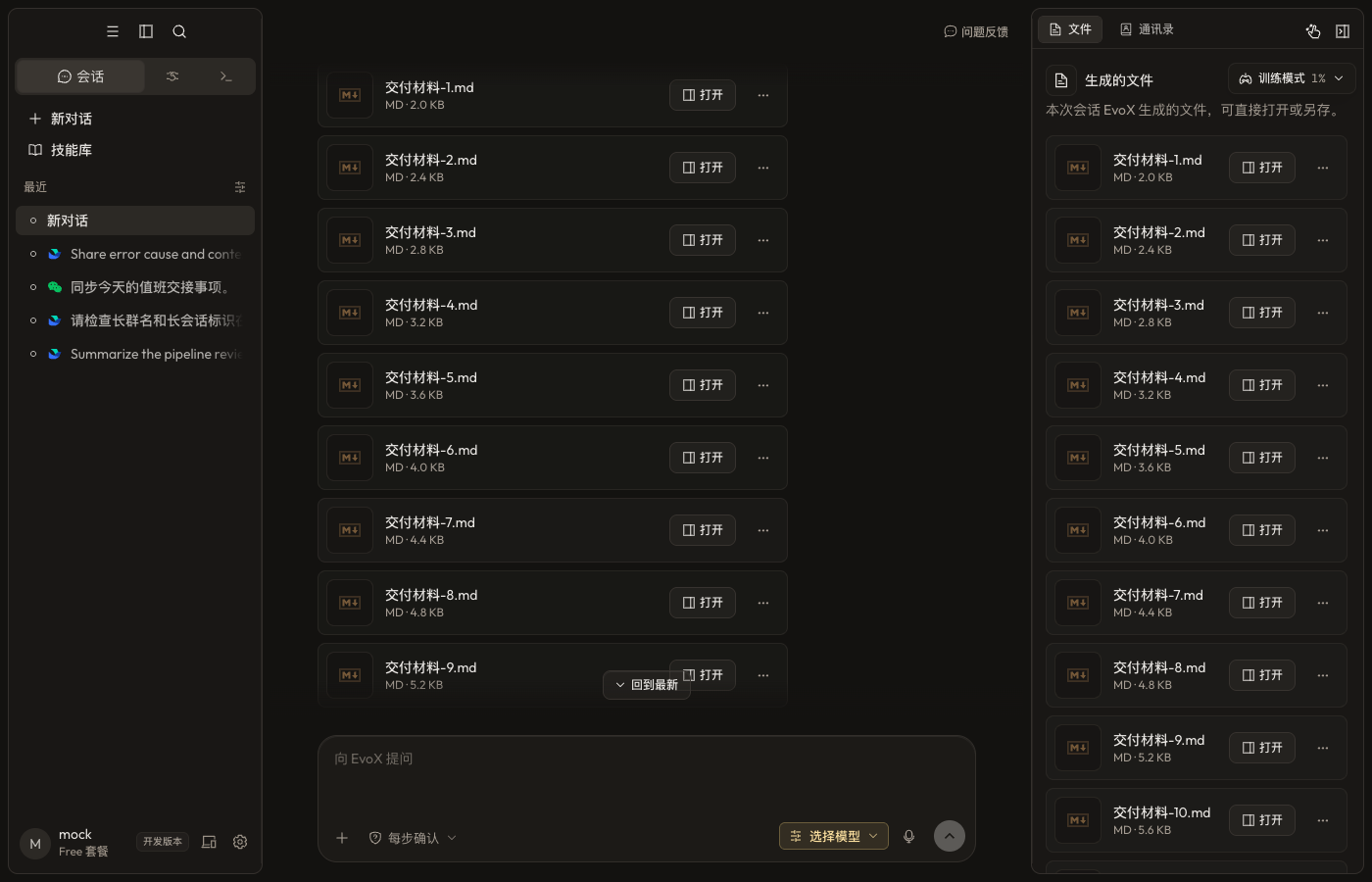
EvoX file preview

Provide source files

  • Attach files that only apply to the current request.
  • Put repeatedly used material in an authorized project folder.
  • Choose a local directory or Git repository for Code and attach related directories when needed.
  • State which files are read-only, which may be changed, where outputs belong, and whether overwriting is allowed.

Create and preview

Depending on available tools and plugins, EvoX can produce Markdown, HTML, PDF, documents, presentations, spreadsheets, images, audio, and other artifacts. The preview shows rendered output, source, or both according to the file type.

HTML can offer rendered and source views. Site deliverables can offer page, source, and side-by-side modes.

Revise an existing file

Name the target file, requested change, and content that must remain stable. Continue editing the existing artifact unless a new version or copy is explicitly requested. Re-render office files and PDFs before export to check pagination, tables, fonts, and images.

Versions and provenance

The artifact list only contains real generated files or explicit preview-tool results; assistant prose alone does not manufacture a file. Verify the active version before continuing edits.

Open the data-cleaning placeholder video

File safety

List the impact before bulk moves, overwrites, or deletion. Do not treat project membership as whole-disk access. Archives, scripts, and web downloads are untrusted input. Before handoff, verify that the file opens, its format and location are correct, and no secrets or restricted data are included.


EvoX Docs · Features · Capabilities

上一篇使用日常 Chrome下一篇参考资料