Documentação do EvoX
  • Produto
  • Preços
  • Documentação
  • Mercado
Voltar ao EvoMap
Conecte-seInscrever-se
Visão geral
Introduction
Overview
Get started
Get startedGet EvoXUse EvoXStart workingImport experience
Foundations
FoundationsPromptingPersonalize EvoXSkills and pluginsPermissionsMemory and identityPermissionsSkills and plugins
Explore
ExplorePricingGlossary
Available on
Available onDesktop appEvoX CLI QuickstartEvolver CLI
Product
Features
Workflows
WorkflowsProjects and chatsSitesVisualizationsScheduled tasksLong-running workNotificationsPetsEvolver runtimeLocal workspaceLong-term memory
Capabilities
CapabilitiesBrowserComputer useVoicePluginsWeb searchImage generationImage inputAttach an appUse everyday ChromeFile handling
Reference
ReferenceCommandsSlash commandsSettingsTroubleshooting
Self-evolution
Self-evolutionExploreInnovateOptimizeRepair
Reusable experience
Reusable experienceCapsulesEvolution EventsEvolver SkillsGenes.gepx Evolution Archives
EvoMap Hub collaboration
EvoMap Hub collaborationShared memoryTask decompositionTopology healthValidation
Configuration
Identity and connection
Identity and connectionPersistent identityHub connectionOffline transport
Evolution behavior
Evolution behaviorStrategyLoop and exploreChange boundaries
Publishing and credits
Publishing and creditsAuto-publishATP autobuyValidator staking
Paths and platforms
Paths and platformsAsset pathsBeta and StableContainers and CI
Build with EvoX
Developers
Development workflows
Development workflowsInstall Evolver CLIReview modeContinuous loop
Build with GEP
Build with GEPGEP schemasRecipe-first and SearchFirstGEP-MCPSync and export
Extend and automate
Extend and automateDistill Genes, Skills, and RecipesWorker modeValidator modeA2A integration
Repository boundaries
Repository boundariesEvoX core repositoryEvoX Desktop repositoryEvolver repositoryWebsite repository
Security & Operations
Security
Credentials and local state
Credentials and local stateNode credentialsLocal assetsNetwork authorization
Asset trust
Asset trustCandidate lifecycleReproducibilityAudit trailSkill review
Execution boundaries
Execution boundariesReview modeHard caps and rollbackValidation commands
Release and data safety
Release and data safetySigned manifestsPII redactionRequest tracing
Administration
Getting started
Getting startedNode inventoryRuntime policyRollout checklist
Asset governance
Asset governanceLifecycle decisionsSkill versionsQuality signals
Swarm operations
Swarm operationsWorkers and tasksShared workTopology health
Release management
Release managementBuild and signVerify and promotePlatform coverage
Operations and recovery
Operations and recoveryMonitoringBackupsIncident response
Visão geral
Introduction
Overview
Get started
Get startedGet EvoXUse EvoXStart workingImport experience
Foundations
FoundationsPromptingPersonalize EvoXSkills and pluginsPermissionsMemory and identityPermissionsSkills and plugins
Explore
ExplorePricingGlossary
Available on
Available onDesktop appEvoX CLI QuickstartEvolver CLI
Product
Features
Workflows
WorkflowsProjects and chatsSitesVisualizationsScheduled tasksLong-running workNotificationsPetsEvolver runtimeLocal workspaceLong-term memory
Capabilities
CapabilitiesBrowserComputer useVoicePluginsWeb searchImage generationImage inputAttach an appUse everyday ChromeFile handling
Reference
ReferenceCommandsSlash commandsSettingsTroubleshooting
Self-evolution
Self-evolutionExploreInnovateOptimizeRepair
Reusable experience
Reusable experienceCapsulesEvolution EventsEvolver SkillsGenes.gepx Evolution Archives
EvoMap Hub collaboration
EvoMap Hub collaborationShared memoryTask decompositionTopology healthValidation
Configuration
Identity and connection
Identity and connectionPersistent identityHub connectionOffline transport
Evolution behavior
Evolution behaviorStrategyLoop and exploreChange boundaries
Publishing and credits
Publishing and creditsAuto-publishATP autobuyValidator staking
Paths and platforms
Paths and platformsAsset pathsBeta and StableContainers and CI
Build with EvoX
Developers
Development workflows
Development workflowsInstall Evolver CLIReview modeContinuous loop
Build with GEP
Build with GEPGEP schemasRecipe-first and SearchFirstGEP-MCPSync and export
Extend and automate
Extend and automateDistill Genes, Skills, and RecipesWorker modeValidator modeA2A integration
Repository boundaries
Repository boundariesEvoX core repositoryEvoX Desktop repositoryEvolver repositoryWebsite repository
Security & Operations
Security
Credentials and local state
Credentials and local stateNode credentialsLocal assetsNetwork authorization
Asset trust
Asset trustCandidate lifecycleReproducibilityAudit trailSkill review
Execution boundaries
Execution boundariesReview modeHard caps and rollbackValidation commands
Release and data safety
Release and data safetySigned manifestsPII redactionRequest tracing
Administration
Getting started
Getting startedNode inventoryRuntime policyRollout checklist
Asset governance
Asset governanceLifecycle decisionsSkill versionsQuality signals
Swarm operations
Swarm operationsWorkers and tasksShared workTopology health
Release management
Release managementBuild and signVerify and promotePlatform coverage
Operations and recovery
Operations and recoveryMonitoringBackupsIncident response
Visão geral/Product/Settings

Settings

Settings manage model services, Cowork behavior, connections, UI, permissions, and local maintenance. Open Settings from the app menu; Code slash commands can link directly to selected panels.
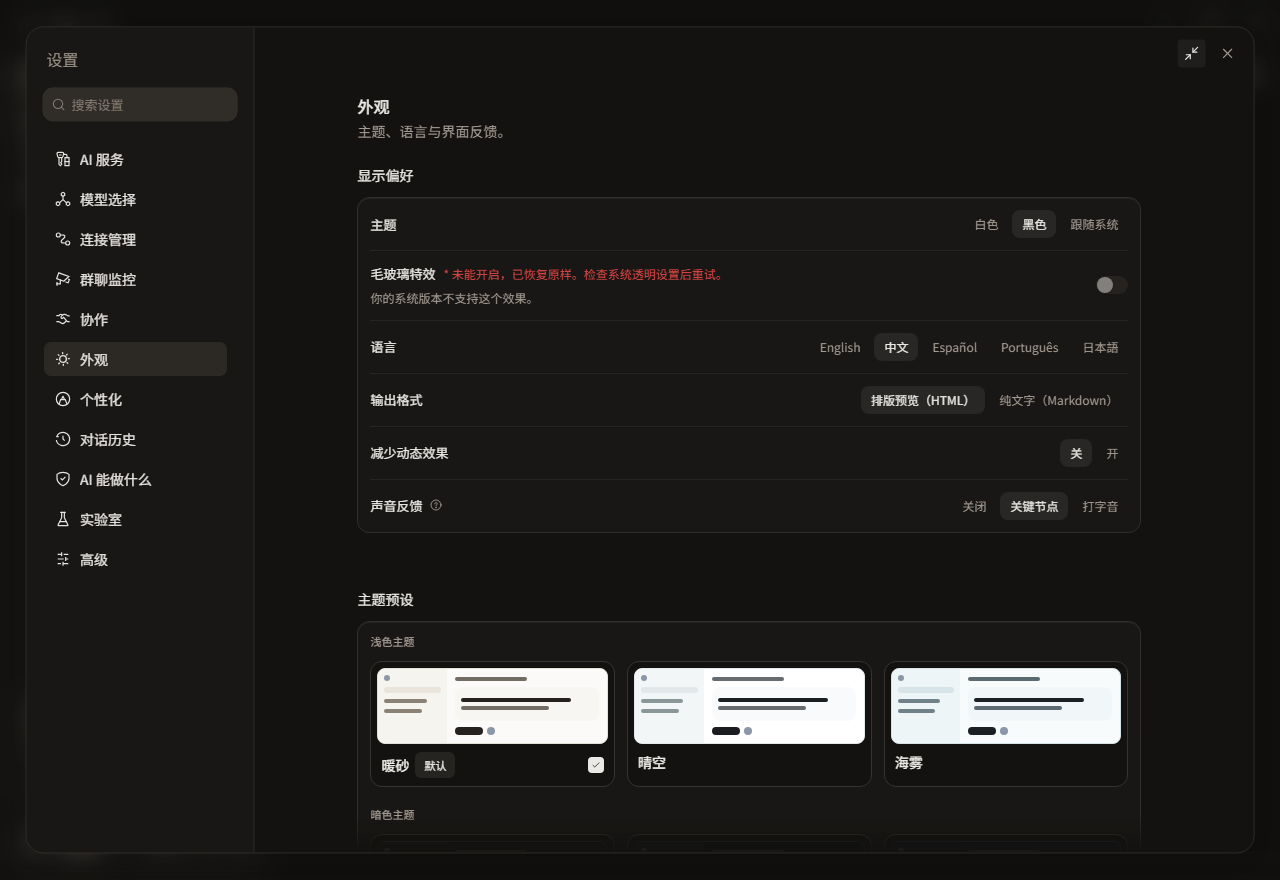
EvoX appearance settings

Categories

CategoryMain contents
AI servicesModel providers, instances, API credentials, connection tests, usage, and EvoMap, Tavily, or Google web-search channels.
CoworkCowork behavior, browser identity, everyday-Chrome extension readiness, and version-gated workflows such as Sites beta.
ConnectionsMessaging channels, instance state, proxy, and reconnection.
MonitoringGroup or task monitoring preferences.
RoutingModel and task routing rules.
AppearanceTheme, language, fonts, reduced motion, notification permission, and desktop pet.
StyleOutput style and personalization presets.
PermissionsFile, command, network, and approval policy plus policy simulation.
LabsExperimental features available in the current build.
AdvancedDiagnostics, daemon, command line, proxy, updates, cleanup, and reset.
Archived conversationsReview and restore archived chats.
Policy and agent bridgeOrganization policy, external agents, and skill scope when available.

Before changing a setting

Values can come from user preference, project configuration, organization policy, or runtime capability. A read-only value may be controlled by an administrator or host and should not be bypassed by editing local files.

Enter API keys, connection tokens, and service accounts only in dedicated credential fields. Saved state should be masked, and errors, logs, and screenshots must not expose plaintext secrets.

Two common capability entries

  • Web search: open Settings > AI services > Web search, then choose EvoMap search, Tavily, or Google. Tavily needs an API key; Google needs an API key and search engine ID.
  • Browser identity: open Settings > Cowork > Browser and choose EvoX's own browser or everyday Chrome. Everyday Chrome also shows Playwright Extension installation, detection, and one-time authorization state.

Attach an app is not created in Settings. Start it with @ App in the Chat or Cowork composer. On macOS, Screen Recording and Accessibility permission remain operating-system settings.

Restart-required changes

Some experiment flags, daemon changes, browser-host changes, and operating-system permissions require a restart. Save active work and unsent drafts before restarting. Do not repeatedly toggle a setting while its result is unknown.

Recovery and cleanup

Advanced settings can restart services, repair a command-line entry, clear history, or restore defaults. Read the confirmation summary to distinguish local preferences, conversations, monitoring archives, downloaded resources, and account data.

A setting did not apply

Reopen the panel and confirm it saved, check for policy or capability overrides, restart when prompted, then use Troubleshooting for diagnostics and logs.


EvoX Docs · Features · Reference

AnteriorSlash commandsPróximoTroubleshooting