Documentação do EvoX
  • Produto
  • Preços
  • Documentação
  • Mercado
Voltar ao EvoMap
Conecte-seInscrever-se
Visão geral
Introduction
Overview
Get started
Get startedGet EvoXUse EvoXStart workingImport experience
Foundations
FoundationsPromptingPersonalize EvoXSkills and pluginsPermissionsMemory and identityPermissionsSkills and plugins
Explore
ExplorePricingGlossary
Available on
Available onDesktop appEvoX CLI QuickstartEvolver CLI
Product
Features
Workflows
WorkflowsProjects and chatsSitesVisualizationsScheduled tasksLong-running workNotificationsPetsEvolver runtimeLocal workspaceLong-term memory
Capabilities
CapabilitiesBrowserComputer useVoicePluginsWeb searchImage generationImage inputAttach an appUse everyday ChromeFile handling
Reference
ReferenceCommandsSlash commandsSettingsTroubleshooting
Self-evolution
Self-evolutionExploreInnovateOptimizeRepair
Reusable experience
Reusable experienceCapsulesEvolution EventsEvolver SkillsGenes.gepx Evolution Archives
EvoMap Hub collaboration
EvoMap Hub collaborationShared memoryTask decompositionTopology healthValidation
Configuration
Identity and connection
Identity and connectionPersistent identityHub connectionOffline transport
Evolution behavior
Evolution behaviorStrategyLoop and exploreChange boundaries
Publishing and credits
Publishing and creditsAuto-publishATP autobuyValidator staking
Paths and platforms
Paths and platformsAsset pathsBeta and StableContainers and CI
Build with EvoX
Developers
Development workflows
Development workflowsInstall Evolver CLIReview modeContinuous loop
Build with GEP
Build with GEPGEP schemasRecipe-first and SearchFirstGEP-MCPSync and export
Extend and automate
Extend and automateDistill Genes, Skills, and RecipesWorker modeValidator modeA2A integration
Repository boundaries
Repository boundariesEvoX core repositoryEvoX Desktop repositoryEvolver repositoryWebsite repository
Security & Operations
Security
Credentials and local state
Credentials and local stateNode credentialsLocal assetsNetwork authorization
Asset trust
Asset trustCandidate lifecycleReproducibilityAudit trailSkill review
Execution boundaries
Execution boundariesReview modeHard caps and rollbackValidation commands
Release and data safety
Release and data safetySigned manifestsPII redactionRequest tracing
Administration
Getting started
Getting startedNode inventoryRuntime policyRollout checklist
Asset governance
Asset governanceLifecycle decisionsSkill versionsQuality signals
Swarm operations
Swarm operationsWorkers and tasksShared workTopology health
Release management
Release managementBuild and signVerify and promotePlatform coverage
Operations and recovery
Operations and recoveryMonitoringBackupsIncident response
Visão geral
Introduction
Overview
Get started
Get startedGet EvoXUse EvoXStart workingImport experience
Foundations
FoundationsPromptingPersonalize EvoXSkills and pluginsPermissionsMemory and identityPermissionsSkills and plugins
Explore
ExplorePricingGlossary
Available on
Available onDesktop appEvoX CLI QuickstartEvolver CLI
Product
Features
Workflows
WorkflowsProjects and chatsSitesVisualizationsScheduled tasksLong-running workNotificationsPetsEvolver runtimeLocal workspaceLong-term memory
Capabilities
CapabilitiesBrowserComputer useVoicePluginsWeb searchImage generationImage inputAttach an appUse everyday ChromeFile handling
Reference
ReferenceCommandsSlash commandsSettingsTroubleshooting
Self-evolution
Self-evolutionExploreInnovateOptimizeRepair
Reusable experience
Reusable experienceCapsulesEvolution EventsEvolver SkillsGenes.gepx Evolution Archives
EvoMap Hub collaboration
EvoMap Hub collaborationShared memoryTask decompositionTopology healthValidation
Configuration
Identity and connection
Identity and connectionPersistent identityHub connectionOffline transport
Evolution behavior
Evolution behaviorStrategyLoop and exploreChange boundaries
Publishing and credits
Publishing and creditsAuto-publishATP autobuyValidator staking
Paths and platforms
Paths and platformsAsset pathsBeta and StableContainers and CI
Build with EvoX
Developers
Development workflows
Development workflowsInstall Evolver CLIReview modeContinuous loop
Build with GEP
Build with GEPGEP schemasRecipe-first and SearchFirstGEP-MCPSync and export
Extend and automate
Extend and automateDistill Genes, Skills, and RecipesWorker modeValidator modeA2A integration
Repository boundaries
Repository boundariesEvoX core repositoryEvoX Desktop repositoryEvolver repositoryWebsite repository
Security & Operations
Security
Credentials and local state
Credentials and local stateNode credentialsLocal assetsNetwork authorization
Asset trust
Asset trustCandidate lifecycleReproducibilityAudit trailSkill review
Execution boundaries
Execution boundariesReview modeHard caps and rollbackValidation commands
Release and data safety
Release and data safetySigned manifestsPII redactionRequest tracing
Administration
Getting started
Getting startedNode inventoryRuntime policyRollout checklist
Asset governance
Asset governanceLifecycle decisionsSkill versionsQuality signals
Swarm operations
Swarm operationsWorkers and tasksShared workTopology health
Release management
Release managementBuild and signVerify and promotePlatform coverage
Operations and recovery
Operations and recoveryMonitoringBackupsIncident response
Visão geral/Product/Projects and chats

Projects and chats

In EvoX, you can start an independent chat or choose a project and keep related work together over time. Projects are useful when work spans multiple conversations, standing rules, folders, or ongoing deliverables. A one-off request usually does not need a project.

Choose a project or start a chat

  • On the Cowork surface, choose an existing project or create one before starting a conversation.
  • A new conversation is filed under the selected project when its first message is sent. Switching the current project does not silently move a conversation that has already started.
  • When its ownership needs to change, drag a Cowork conversation into another project. Tasks and artifacts bound to that conversation move with it.
  • When the work is independent and needs no project rules or folders, start a new chat directly.

Work inside a project

A project is more than a folder of conversations. An EvoX Cowork project can bring together:

  • Related conversations and tasks: the project view collects the conversations, tasks, and artifacts filed under that project.
  • Working rules: add standing rules and enable or disable them individually. Cowork conversations filed under the project use its currently enabled rules.
  • Authorized folders: connect one or more local folders to define the file scope available to the project.
  • Artifact destination: choose an authorized folder for project outputs. When none is selected, EvoX uses the project's managed folder or the applicable default location.
  • Project details: the project wall and detail view provide access to project content, folders, working rules, and related results.

Each conversation still keeps its own transcript. A project supplies project-level rules, file scope, and ownership, but it does not copy every past message into every other conversation. Provide any specific source material again when the current conversation needs it.
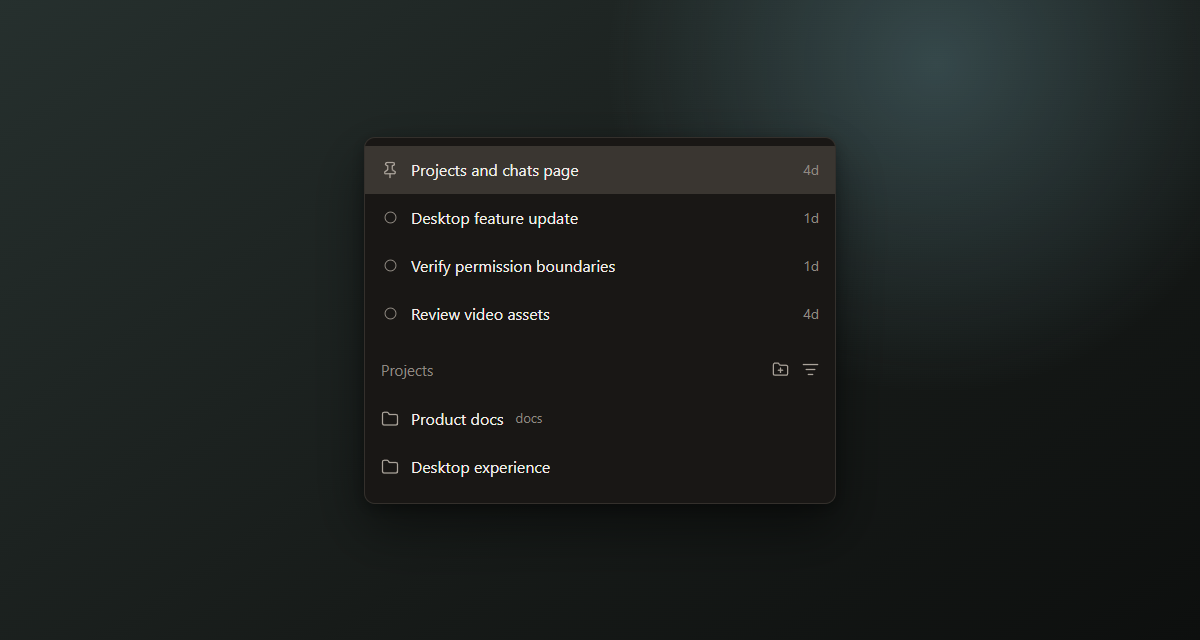
EvoX projects and chats interface mockup

Organize projects and chats

To keep active work visible, you can:

  • Rename projects or conversations so their titles reflect the current work.
  • Pin projects or conversations, and drag pinned conversations into the preferred order.
  • Search conversations globally by title or transcript text across Chat, Cowork, and Code.
  • Move Cowork conversations by dragging them into a target project together with their related results.
  • Archive and restore completed projects or conversations. Archiving is not the same as deleting.
  • Delete conversations that are no longer needed. Deletion is destructive and should be used only after confirming the conversation does not need to be recovered.

Use local folders and code repositories

A Cowork project can connect authorized local folders. EvoX can read or change files only within the scope allowed for the active project, and high-impact actions such as deletion still follow the current confirmation and permission settings.

In Code mode, you can also:

  • Select a local directory or Git repository as the primary workspace.
  • Attach multiple related directories or repositories to the same local Code conversation. Attached roots stay scoped to that conversation and are not silently carried into other conversations or remote environments.
  • Use Git worktrees to isolate parallel tasks and prevent unrelated changes from overlapping.
  • Inspect files, run code, and use supported flows to review local changes or code reviews.

These coding capabilities apply only to the relevant local workspace and Code mode. They do not give an ordinary chat automatic access to local files.

Start a chat without a project

When the work is independent and does not need shared project rules, authorized folders, or artifact ownership, create a new conversation in Chat. Chat is suitable for questions, analysis of a single source, and one-off tasks, and can use the files, images, skills, and plugins available to that conversation.

Bring in files, images, skills, and plugins

  • Add files or images to the relevant conversation so EvoX can read and process them for the current request.
  • Invoke installed skills from Chat, Cowork, or Code surfaces that provide a skills entry point.
  • Use plugins to connect external services. What a plugin can read or do depends on its capabilities, connection state, and permission settings.
  • Project ownership does not grant new permissions or make unauthorized folders and external services accessible.

Limits and considerations

  • After a project is archived, its rules and authorized folders no longer act as active project context. Restore the project when that context is needed again.
  • Projects, conversations, folders, and workspaces are separate layers. Filing conversations under one project does not make every conversation read all other transcripts automatically.
  • Worktrees, multi-root workspaces, and code-review tools should be used only in Code mode and when supported by the current repository.
  • Before deletion, external writes, publishing, credential use, or production changes, review the permissions, confirmation points, and recovery path.
  • Available entry points can vary by EvoX version, operating system, active mode, and installed skills or plugins.

Next steps

Continue with File handling, Skills and plugins, and Permissions.


EvoX Docs · features · Workflows

AnteriorWorkflowsPróximoSites