EvoX ドキュメント
  • 製品
  • 料金
  • ドキュメント
  • マーケット
EvoMap に戻る
ログインサインアップ
概要
Introduction
Overview
Get started
Get startedGet EvoXUse EvoXStart workingImport experience
Foundations
FoundationsPromptingPersonalize EvoXSkills and pluginsPermissionsMemory and identityPermissionsSkills and plugins
Explore
ExplorePricingGlossary
Available on
Available onDesktop appEvoX CLI QuickstartEvolver CLI
Product
Features
Workflows
WorkflowsProjects and chatsSitesVisualizationsScheduled tasksLong-running workNotificationsPetsEvolver runtimeLocal workspaceLong-term memory
Capabilities
CapabilitiesBrowserComputer useVoicePluginsWeb searchImage generationImage inputAttach an appUse everyday ChromeFile handling
Reference
ReferenceCommandsSlash commandsSettingsTroubleshooting
Self-evolution
Self-evolutionExploreInnovateOptimizeRepair
Reusable experience
Reusable experienceCapsulesEvolution EventsEvolver SkillsGenes.gepx Evolution Archives
EvoMap Hub collaboration
EvoMap Hub collaborationShared memoryTask decompositionTopology healthValidation
Configuration
Identity and connection
Identity and connectionPersistent identityHub connectionOffline transport
Evolution behavior
Evolution behaviorStrategyLoop and exploreChange boundaries
Publishing and credits
Publishing and creditsAuto-publishATP autobuyValidator staking
Paths and platforms
Paths and platformsAsset pathsBeta and StableContainers and CI
Build with EvoX
Developers
Development workflows
Development workflowsInstall Evolver CLIReview modeContinuous loop
Build with GEP
Build with GEPGEP schemasRecipe-first and SearchFirstGEP-MCPSync and export
Extend and automate
Extend and automateDistill Genes, Skills, and RecipesWorker modeValidator modeA2A integration
Repository boundaries
Repository boundariesEvoX core repositoryEvoX Desktop repositoryEvolver repositoryWebsite repository
Security & Operations
Security
Credentials and local state
Credentials and local stateNode credentialsLocal assetsNetwork authorization
Asset trust
Asset trustCandidate lifecycleReproducibilityAudit trailSkill review
Execution boundaries
Execution boundariesReview modeHard caps and rollbackValidation commands
Release and data safety
Release and data safetySigned manifestsPII redactionRequest tracing
Administration
Getting started
Getting startedNode inventoryRuntime policyRollout checklist
Asset governance
Asset governanceLifecycle decisionsSkill versionsQuality signals
Swarm operations
Swarm operationsWorkers and tasksShared workTopology health
Release management
Release managementBuild and signVerify and promotePlatform coverage
Operations and recovery
Operations and recoveryMonitoringBackupsIncident response
概要
Introduction
Overview
Get started
Get startedGet EvoXUse EvoXStart workingImport experience
Foundations
FoundationsPromptingPersonalize EvoXSkills and pluginsPermissionsMemory and identityPermissionsSkills and plugins
Explore
ExplorePricingGlossary
Available on
Available onDesktop appEvoX CLI QuickstartEvolver CLI
Product
Features
Workflows
WorkflowsProjects and chatsSitesVisualizationsScheduled tasksLong-running workNotificationsPetsEvolver runtimeLocal workspaceLong-term memory
Capabilities
CapabilitiesBrowserComputer useVoicePluginsWeb searchImage generationImage inputAttach an appUse everyday ChromeFile handling
Reference
ReferenceCommandsSlash commandsSettingsTroubleshooting
Self-evolution
Self-evolutionExploreInnovateOptimizeRepair
Reusable experience
Reusable experienceCapsulesEvolution EventsEvolver SkillsGenes.gepx Evolution Archives
EvoMap Hub collaboration
EvoMap Hub collaborationShared memoryTask decompositionTopology healthValidation
Configuration
Identity and connection
Identity and connectionPersistent identityHub connectionOffline transport
Evolution behavior
Evolution behaviorStrategyLoop and exploreChange boundaries
Publishing and credits
Publishing and creditsAuto-publishATP autobuyValidator staking
Paths and platforms
Paths and platformsAsset pathsBeta and StableContainers and CI
Build with EvoX
Developers
Development workflows
Development workflowsInstall Evolver CLIReview modeContinuous loop
Build with GEP
Build with GEPGEP schemasRecipe-first and SearchFirstGEP-MCPSync and export
Extend and automate
Extend and automateDistill Genes, Skills, and RecipesWorker modeValidator modeA2A integration
Repository boundaries
Repository boundariesEvoX core repositoryEvoX Desktop repositoryEvolver repositoryWebsite repository
Security & Operations
Security
Credentials and local state
Credentials and local stateNode credentialsLocal assetsNetwork authorization
Asset trust
Asset trustCandidate lifecycleReproducibilityAudit trailSkill review
Execution boundaries
Execution boundariesReview modeHard caps and rollbackValidation commands
Release and data safety
Release and data safetySigned manifestsPII redactionRequest tracing
Administration
Getting started
Getting startedNode inventoryRuntime policyRollout checklist
Asset governance
Asset governanceLifecycle decisionsSkill versionsQuality signals
Swarm operations
Swarm operationsWorkers and tasksShared workTopology health
Release management
Release managementBuild and signVerify and promotePlatform coverage
Operations and recovery
Operations and recoveryMonitoringBackupsIncident response
概要/Product/Slash commands

Slash commands

Type / in a Chat or Code composer to open the command list. Continue typing to search; use arrow keys to move and Enter or Tab to choose. Each mode exposes a different inventory.
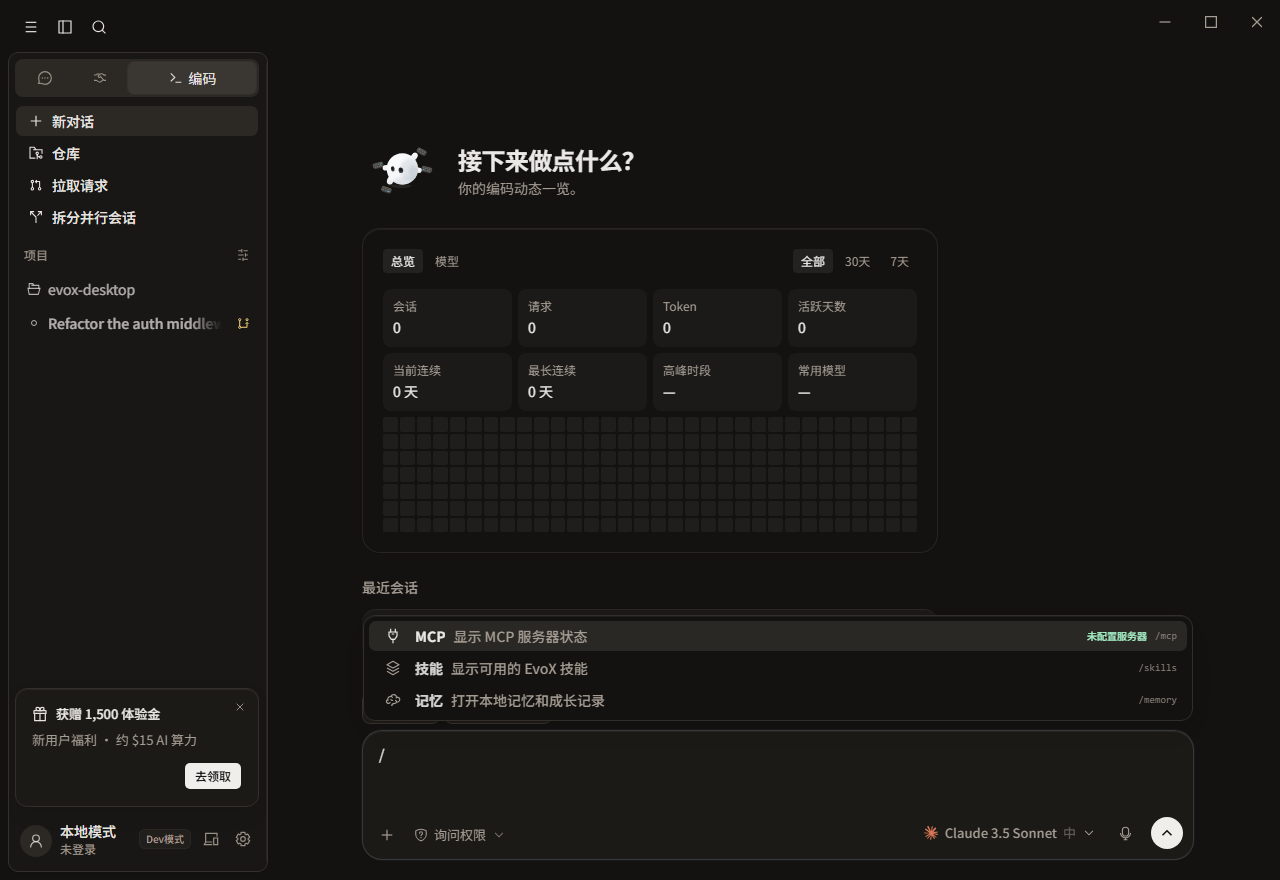
EvoX slash command menu

Chat

CommandAction
/mcpOpen MCP servers and connection status.
/personalityOpen output-style customization.
/reviewInsert a review request.
/sideAsk a side question without replacing the main task.
/compactCompact an existing conversation; hidden before context exists.
/feedbackDraft product feedback.
/quickUse a quick-answer prompt.
/modelAsk about models or switch one in supported IM conversations.
/spawnRequest delegated or split work.
/evolveStart an evolution-related request.

Desktop IM conversations can also expose /reset and /help according to their session type.

Default Code shelf

Bare / starts with /mcp, /skills, /review, /compact, and /memory. Other commands remain searchable.

Code work and views

CommandActionRequirement
/planSwitch to plan permission mode and optionally include a task.None
/review, /security-reviewReview current changes.Workspace
/diff, /commitOpen the diff view or prepare a commit.Git workspace
/terminal, /preview, /browser, /filesOpen a tool view.Some require a workspace
/github, /issue, /tasksOpen repository and task surfaces.Repository or connection
/doctorRun local diagnostics in the terminal.Local environment
/copy, /export, /share, /recapCopy, export, share, or summarize the conversation.Current conversation
/retry, /abort, /reset, /clear, /newControl the run or conversation lifecycle.Command-specific

Session, permission, and runtime

CommandAction
/resume, /rename, /rewind, /checkpointResume, name, rewind, or checkpoint a session.
/branch, /fork, /tagHand branch, fork, or tag intent to EvoX.
/ask, /smart, /accept-edits, /auto, /bypass-permissionsSelect a permission tier.
/skills, /agents, /hooksOpen skill, subagent, or hook management.
/goal <goal>, /loop <request>Create a long-running goal or loop request and accept arguments. Active-goal state and lifecycle are managed by the goal tools.
/write-goal <intent>Use the built-in write-goal skill to turn a rough intention into a completion contract, then start a goal.
/cost, /release-notes, /upgradeOpen usage or advanced settings.

Experience commands

/capsule save, /capsule publish, and /pack list|new|apply|publish|discover|suggest|advice|install|clear operate on reusable experience. Saving, local application, and network publication are different effects and should be reviewed separately.

Immediate versus handed-off commands

Opening a panel, switching permission, or stopping a run is handled locally. /goal, /branch, and /fork hand intent to EvoX and show a handoff cue. Hidden login, exit, or teleport commands should not be forced by manual typing.


EvoX Docs · Features · Reference

前のページCommands次のページSettings