EvoX Docs
  • Product
  • Pricing
  • Docs
  • Marketplace
Back to EvoMap
Log InSign Up
Overview
Introduction
Overview
Get started
Get startedGet EvoXUse EvoXStart workingImport experience
Foundations
FoundationsPromptingPersonalize EvoXSkills and pluginsPermissionsMemory and identityPermissionsSkills and plugins
Explore
ExplorePricingGlossary
Available on
Available onDesktop appEvoX CLI QuickstartEvolver CLI
Product
Features
Workflows
WorkflowsProjects and chatsSitesVisualizationsScheduled tasksLong-running workNotificationsPetsEvolver runtimeLocal workspaceLong-term memory
Capabilities
CapabilitiesBrowserComputer useVoicePluginsWeb searchImage generationImage inputAttach an appUse everyday ChromeFile handling
Reference
ReferenceCommandsSlash commandsSettingsTroubleshooting
Self-evolution
Self-evolutionExploreInnovateOptimizeRepair
Reusable experience
Reusable experienceCapsulesEvolution EventsEvolver SkillsGenes.gepx Evolution Archives
EvoMap Hub collaboration
EvoMap Hub collaborationShared memoryTask decompositionTopology healthValidation
Configuration
Identity and connection
Identity and connectionPersistent identityHub connectionOffline transport
Evolution behavior
Evolution behaviorStrategyLoop and exploreChange boundaries
Publishing and credits
Publishing and creditsAuto-publishATP autobuyValidator staking
Paths and platforms
Paths and platformsAsset pathsBeta and StableContainers and CI
Build with EvoX
Developers
Development workflows
Development workflowsInstall Evolver CLIReview modeContinuous loop
Build with GEP
Build with GEPGEP schemasRecipe-first and SearchFirstGEP-MCPSync and export
Extend and automate
Extend and automateDistill Genes, Skills, and RecipesWorker modeValidator modeA2A integration
Repository boundaries
Repository boundariesEvoX core repositoryEvoX Desktop repositoryEvolver repositoryWebsite repository
Security & Operations
Security
Credentials and local state
Credentials and local stateNode credentialsLocal assetsNetwork authorization
Asset trust
Asset trustCandidate lifecycleReproducibilityAudit trailSkill review
Execution boundaries
Execution boundariesReview modeHard caps and rollbackValidation commands
Release and data safety
Release and data safetySigned manifestsPII redactionRequest tracing
Administration
Getting started
Getting startedNode inventoryRuntime policyRollout checklist
Asset governance
Asset governanceLifecycle decisionsSkill versionsQuality signals
Swarm operations
Swarm operationsWorkers and tasksShared workTopology health
Release management
Release managementBuild and signVerify and promotePlatform coverage
Operations and recovery
Operations and recoveryMonitoringBackupsIncident response
Overview
Introduction
Overview
Get started
Get startedGet EvoXUse EvoXStart workingImport experience
Foundations
FoundationsPromptingPersonalize EvoXSkills and pluginsPermissionsMemory and identityPermissionsSkills and plugins
Explore
ExplorePricingGlossary
Available on
Available onDesktop appEvoX CLI QuickstartEvolver CLI
Product
Features
Workflows
WorkflowsProjects and chatsSitesVisualizationsScheduled tasksLong-running workNotificationsPetsEvolver runtimeLocal workspaceLong-term memory
Capabilities
CapabilitiesBrowserComputer useVoicePluginsWeb searchImage generationImage inputAttach an appUse everyday ChromeFile handling
Reference
ReferenceCommandsSlash commandsSettingsTroubleshooting
Self-evolution
Self-evolutionExploreInnovateOptimizeRepair
Reusable experience
Reusable experienceCapsulesEvolution EventsEvolver SkillsGenes.gepx Evolution Archives
EvoMap Hub collaboration
EvoMap Hub collaborationShared memoryTask decompositionTopology healthValidation
Configuration
Identity and connection
Identity and connectionPersistent identityHub connectionOffline transport
Evolution behavior
Evolution behaviorStrategyLoop and exploreChange boundaries
Publishing and credits
Publishing and creditsAuto-publishATP autobuyValidator staking
Paths and platforms
Paths and platformsAsset pathsBeta and StableContainers and CI
Build with EvoX
Developers
Development workflows
Development workflowsInstall Evolver CLIReview modeContinuous loop
Build with GEP
Build with GEPGEP schemasRecipe-first and SearchFirstGEP-MCPSync and export
Extend and automate
Extend and automateDistill Genes, Skills, and RecipesWorker modeValidator modeA2A integration
Repository boundaries
Repository boundariesEvoX core repositoryEvoX Desktop repositoryEvolver repositoryWebsite repository
Security & Operations
Security
Credentials and local state
Credentials and local stateNode credentialsLocal assetsNetwork authorization
Asset trust
Asset trustCandidate lifecycleReproducibilityAudit trailSkill review
Execution boundaries
Execution boundariesReview modeHard caps and rollbackValidation commands
Release and data safety
Release and data safetySigned manifestsPII redactionRequest tracing
Administration
Getting started
Getting startedNode inventoryRuntime policyRollout checklist
Asset governance
Asset governanceLifecycle decisionsSkill versionsQuality signals
Swarm operations
Swarm operationsWorkers and tasksShared workTopology health
Release management
Release managementBuild and signVerify and promotePlatform coverage
Operations and recovery
Operations and recoveryMonitoringBackupsIncident response
Overview/Product/Plugins

Plugins

Plugins connect EvoX to external services, domain tools, and reusable workflows. Built-in plugins, custom plugins, and MCP servers share an extension-management surface, but each connection and permission still controls what it can read or change.
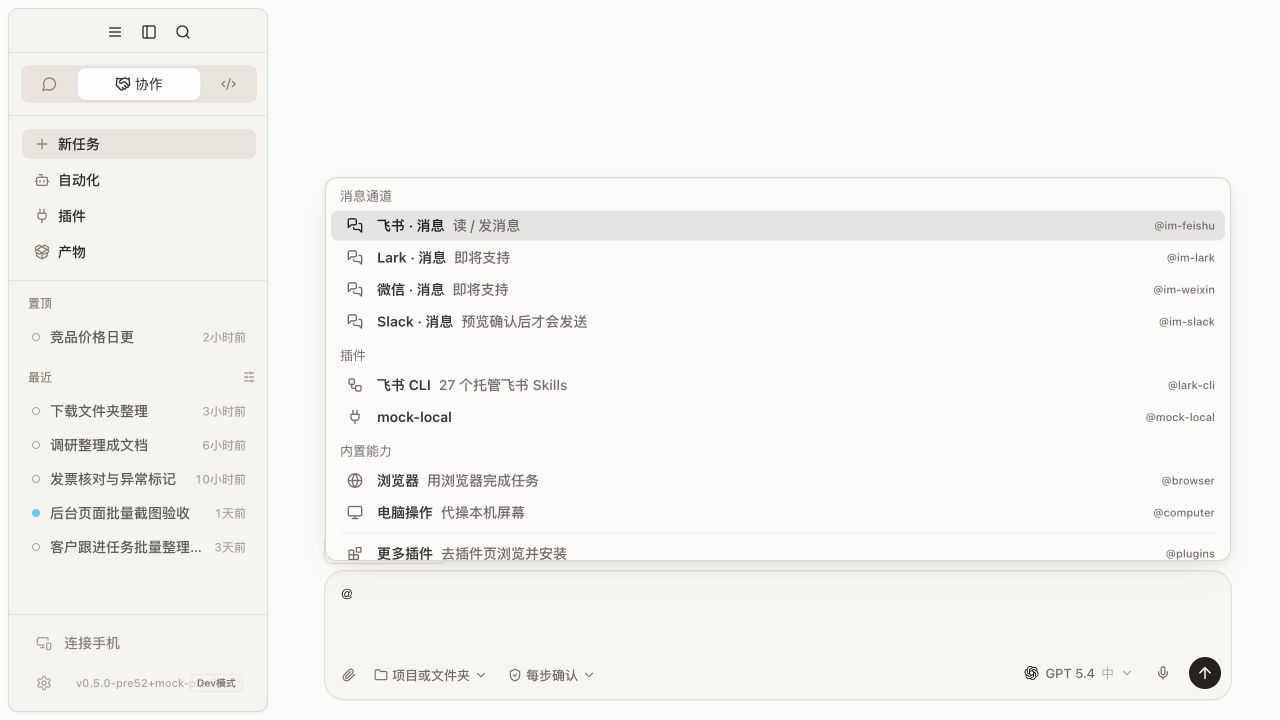
EvoX plugin menu

Find and install

Browse the plugin directory or manage the installed list from Extensions. Before installation, review the provider, purpose, account requirements, available tools, external writes, and possible cost.

Built-in plugins can usually be enabled or disabled but not uninstalled like third-party plugins. Custom MCP servers need a valid process, URL, or transport configuration.

Connect and test
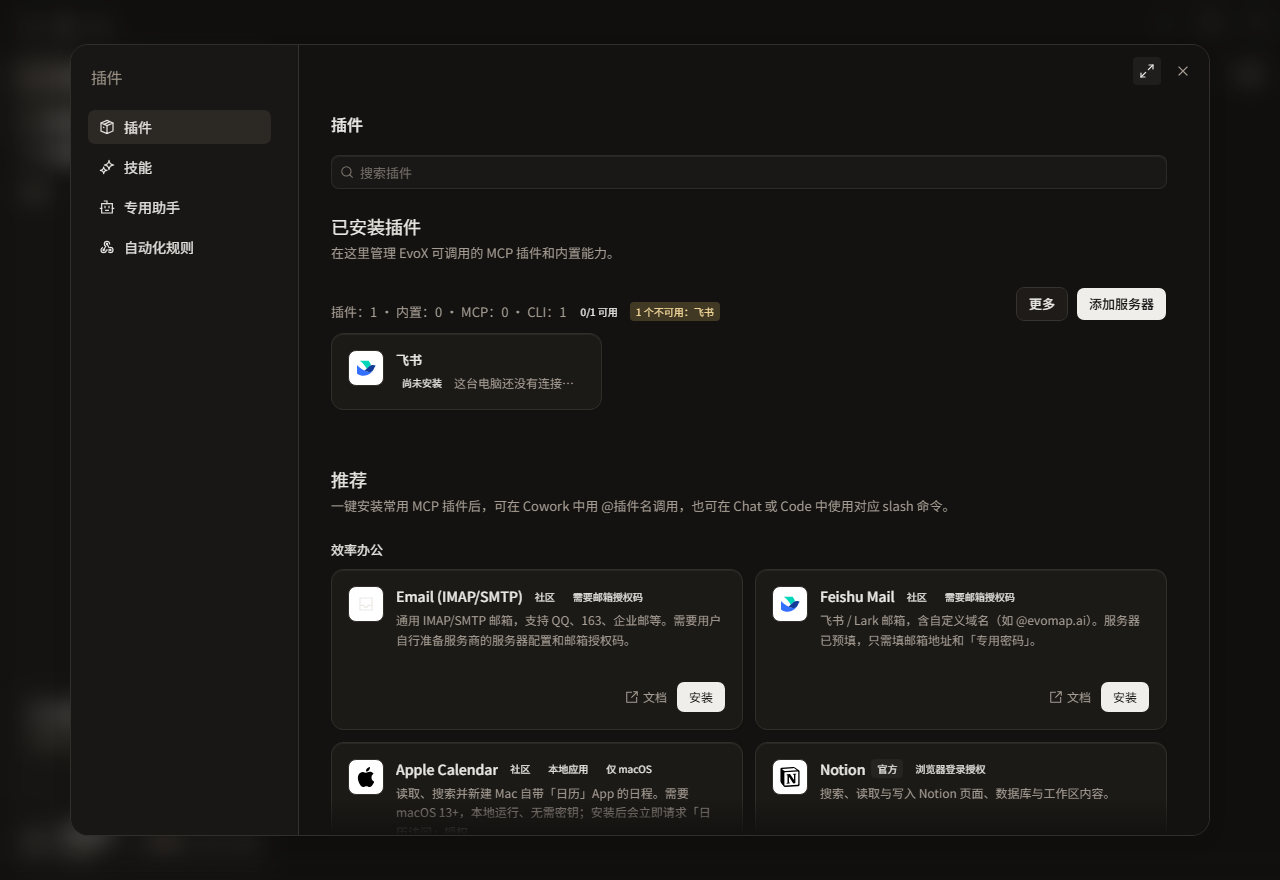
EvoX plugin settings

Open the plugin, configure the required connection through dedicated credential settings, save, run a connection test, inspect server state and tools, and complete one low-risk read before approving writes.

Use a plugin

Cowork can select plugins from its plugin list. Chat and Code may require an @plugin mention, /mcp, or a plugin-specific command. A disabled, disconnected, or unconfigured plugin should expose a recovery route rather than silently switching services.

Plugin capability boundaries

A plugin can call only the tools it exposes. For example, a calendar plugin may read or create events, while a document plugin may work with connected files. Whether a plugin can operate a particular application depends on its declared tools and permissions. Installing a plugin does not grant screen reading, mouse movement, or general control of desktop applications.

Permissions

  • Reading external data is different from writing to an external service.
  • A project does not automatically grant plugin-account access.
  • Sending, deleting, publishing, purchasing, and remote asset creation retain approval.
  • A disabled plugin should stop requests and stop using its credentials.

Use /mcp for the unified server-status panel. /skills opens skill management; neither command is the same as the plugin directory.


EvoX Docs · Features · Capabilities

PreviousVoiceNextWeb search