Documentación de EvoX
  • Producto
  • Precios
  • Documentación
  • Mercado
Volver a EvoMap
Iniciar sesiónRegistrarse
Resumen
Introduction
Overview
Get started
Get startedGet EvoXUse EvoXStart workingImport experience
Foundations
FoundationsPromptingPersonalize EvoXSkills and pluginsPermissionsMemory and identityPermissionsSkills and plugins
Explore
ExplorePricingGlossary
Available on
Available onDesktop appEvoX CLI QuickstartEvolver CLI
Product
Features
Workflows
WorkflowsProjects and chatsSitesVisualizationsScheduled tasksLong-running workNotificationsPetsEvolver runtimeLocal workspaceLong-term memory
Capabilities
CapabilitiesBrowserComputer useVoicePluginsWeb searchImage generationImage inputAttach an appUse everyday ChromeFile handling
Reference
ReferenceCommandsSlash commandsSettingsTroubleshooting
Self-evolution
Self-evolutionExploreInnovateOptimizeRepair
Reusable experience
Reusable experienceCapsulesEvolution EventsEvolver SkillsGenes.gepx Evolution Archives
EvoMap Hub collaboration
EvoMap Hub collaborationShared memoryTask decompositionTopology healthValidation
Configuration
Identity and connection
Identity and connectionPersistent identityHub connectionOffline transport
Evolution behavior
Evolution behaviorStrategyLoop and exploreChange boundaries
Publishing and credits
Publishing and creditsAuto-publishATP autobuyValidator staking
Paths and platforms
Paths and platformsAsset pathsBeta and StableContainers and CI
Build with EvoX
Developers
Development workflows
Development workflowsInstall Evolver CLIReview modeContinuous loop
Build with GEP
Build with GEPGEP schemasRecipe-first and SearchFirstGEP-MCPSync and export
Extend and automate
Extend and automateDistill Genes, Skills, and RecipesWorker modeValidator modeA2A integration
Repository boundaries
Repository boundariesEvoX core repositoryEvoX Desktop repositoryEvolver repositoryWebsite repository
Security & Operations
Security
Credentials and local state
Credentials and local stateNode credentialsLocal assetsNetwork authorization
Asset trust
Asset trustCandidate lifecycleReproducibilityAudit trailSkill review
Execution boundaries
Execution boundariesReview modeHard caps and rollbackValidation commands
Release and data safety
Release and data safetySigned manifestsPII redactionRequest tracing
Administration
Getting started
Getting startedNode inventoryRuntime policyRollout checklist
Asset governance
Asset governanceLifecycle decisionsSkill versionsQuality signals
Swarm operations
Swarm operationsWorkers and tasksShared workTopology health
Release management
Release managementBuild and signVerify and promotePlatform coverage
Operations and recovery
Operations and recoveryMonitoringBackupsIncident response
Resumen
Introduction
Overview
Get started
Get startedGet EvoXUse EvoXStart workingImport experience
Foundations
FoundationsPromptingPersonalize EvoXSkills and pluginsPermissionsMemory and identityPermissionsSkills and plugins
Explore
ExplorePricingGlossary
Available on
Available onDesktop appEvoX CLI QuickstartEvolver CLI
Product
Features
Workflows
WorkflowsProjects and chatsSitesVisualizationsScheduled tasksLong-running workNotificationsPetsEvolver runtimeLocal workspaceLong-term memory
Capabilities
CapabilitiesBrowserComputer useVoicePluginsWeb searchImage generationImage inputAttach an appUse everyday ChromeFile handling
Reference
ReferenceCommandsSlash commandsSettingsTroubleshooting
Self-evolution
Self-evolutionExploreInnovateOptimizeRepair
Reusable experience
Reusable experienceCapsulesEvolution EventsEvolver SkillsGenes.gepx Evolution Archives
EvoMap Hub collaboration
EvoMap Hub collaborationShared memoryTask decompositionTopology healthValidation
Configuration
Identity and connection
Identity and connectionPersistent identityHub connectionOffline transport
Evolution behavior
Evolution behaviorStrategyLoop and exploreChange boundaries
Publishing and credits
Publishing and creditsAuto-publishATP autobuyValidator staking
Paths and platforms
Paths and platformsAsset pathsBeta and StableContainers and CI
Build with EvoX
Developers
Development workflows
Development workflowsInstall Evolver CLIReview modeContinuous loop
Build with GEP
Build with GEPGEP schemasRecipe-first and SearchFirstGEP-MCPSync and export
Extend and automate
Extend and automateDistill Genes, Skills, and RecipesWorker modeValidator modeA2A integration
Repository boundaries
Repository boundariesEvoX core repositoryEvoX Desktop repositoryEvolver repositoryWebsite repository
Security & Operations
Security
Credentials and local state
Credentials and local stateNode credentialsLocal assetsNetwork authorization
Asset trust
Asset trustCandidate lifecycleReproducibilityAudit trailSkill review
Execution boundaries
Execution boundariesReview modeHard caps and rollbackValidation commands
Release and data safety
Release and data safetySigned manifestsPII redactionRequest tracing
Administration
Getting started
Getting startedNode inventoryRuntime policyRollout checklist
Asset governance
Asset governanceLifecycle decisionsSkill versionsQuality signals
Swarm operations
Swarm operationsWorkers and tasksShared workTopology health
Release management
Release managementBuild and signVerify and promotePlatform coverage
Operations and recovery
Operations and recoveryMonitoringBackupsIncident response
Resumen/Product/File handling

File handling

EvoX can read conversation attachments and files in authorized project folders, create new artifacts, and preview, revise, and export supported file types.
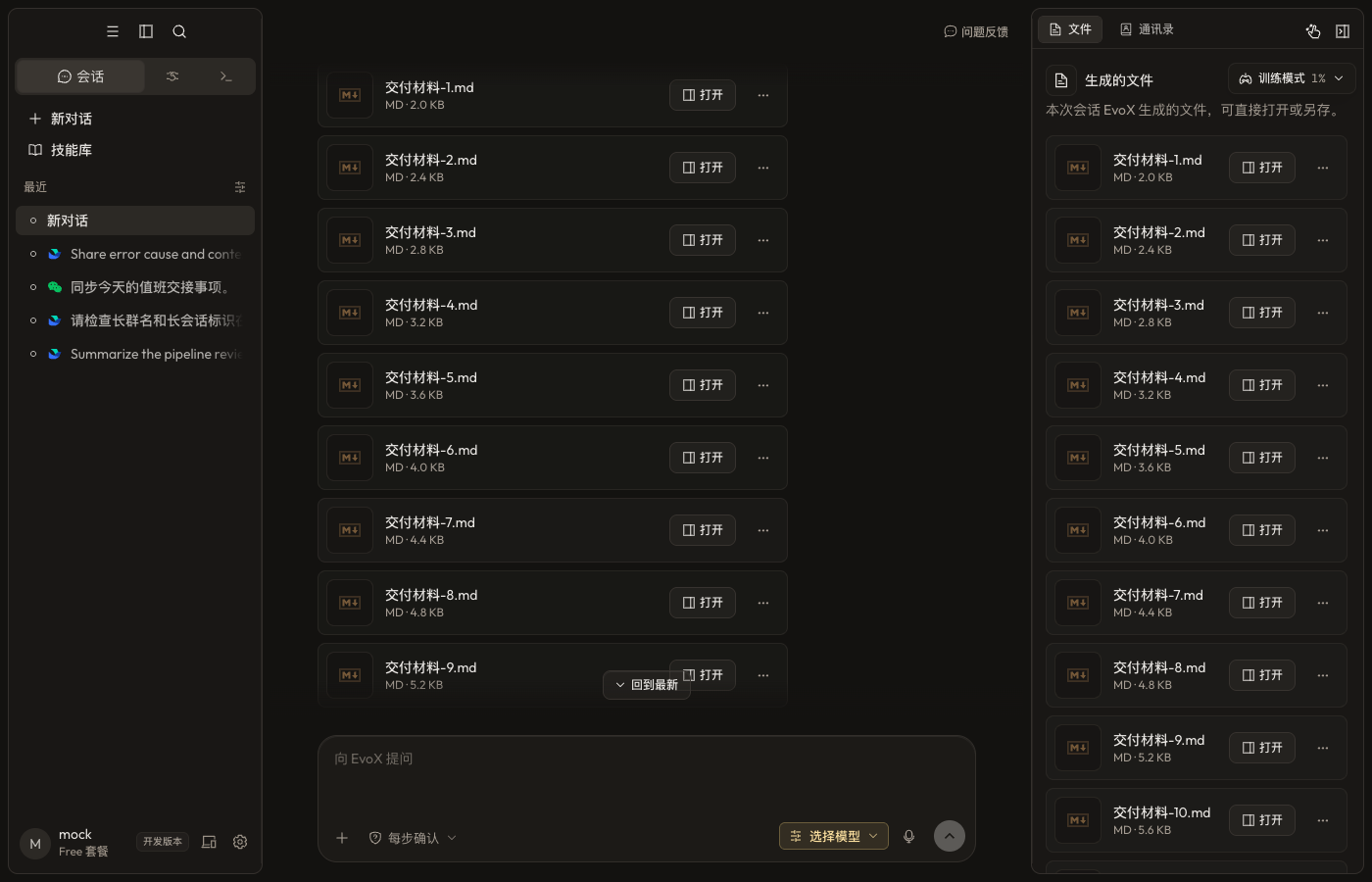
EvoX file preview

Provide source files

  • Attach files that only apply to the current request.
  • Put repeatedly used material in an authorized project folder.
  • Choose a local directory or Git repository for Code and attach related directories when needed.
  • State which files are read-only, which may be changed, where outputs belong, and whether overwriting is allowed.

Create and preview

Depending on available tools and plugins, EvoX can produce Markdown, HTML, PDF, documents, presentations, spreadsheets, images, audio, and other artifacts. The preview shows rendered output, source, or both according to the file type.

HTML can offer rendered and source views. Site deliverables can offer page, source, and side-by-side modes.

Revise an existing file

Name the target file, requested change, and content that must remain stable. Continue editing the existing artifact unless a new version or copy is explicitly requested. Re-render office files and PDFs before export to check pagination, tables, fonts, and images.

Versions and provenance

The artifact list only contains real generated files or explicit preview-tool results; assistant prose alone does not manufacture a file. Verify the active version before continuing edits.

Open the data-cleaning placeholder video

File safety

List the impact before bulk moves, overwrites, or deletion. Do not treat project membership as whole-disk access. Archives, scripts, and web downloads are untrusted input. Before handoff, verify that the file opens, its format and location are correct, and no secrets or restricted data are included.


EvoX Docs · Features · Capabilities

AnteriorUse everyday ChromeSiguienteReference